LangChain
LangChain简介
LangChain 由 Harrison Chase 创建于2022年10月,它是围绕LLMs(大语言模型)建立的一个框架。
LangChain自身并不开发LLMs,它的核心理念是为各种LLMs实现通用的接口,把LLMs相关的组件“链接”在一起,简化LLMs应用的开发难度,方便开发者快速地开发复杂的LLMs应用。
我们将其划分为六类
- Prompts (提示词工程)
- Models (调用模型)
- History (管理会话记录历史)
- Indexes (管理分析各类文档)
- Chains (构建功能的执行链条)
- Agent (构建智能体)
基本围绕了大模型所有的要求,实际上是一个Python的第三方库,提供了各种功能的Api
LangChain安装
1
|
pip install langchain langchain-community langchain-ollama dashscope chromadb
|
- langchain: 核心包
- langchain-community: 社区支持包,提供了更多的第三方模型调用(我们用的阿里云千问模型就需要这个包)
- langchain-ollama: Ollama支持包,支持调用Ollama托管部署的本地模型
- dashscope: 阿里云通义千问的Python SDK
- chromadb: 轻量向量数据库(后续使用)
RAG
RAG介绍
通用的基础大模型存在一些问题:
- LLM 的知识不是实时的,模型训练好后不具备自动更新知识的能力,会导致部分信息滞后
- LLM 领域知识是缺乏的,大模型的知识来源于训练数据,这些数据主要来自公开的互联网和开源数据集,无法覆盖特定领域或高度专业化的内部知识
- 幻觉问题,LLM 有时会在回答中生成看似合理但实际上是错误的信息
- 数据安全性
RAG(Retrieval-Augmented Generation)即检索增强生成,为大模型提供了从特定数据源检索到的信息,以此来修正和补充生成的答案。可以总结为一个公式:RAG = 检索技术 + LLM 提示
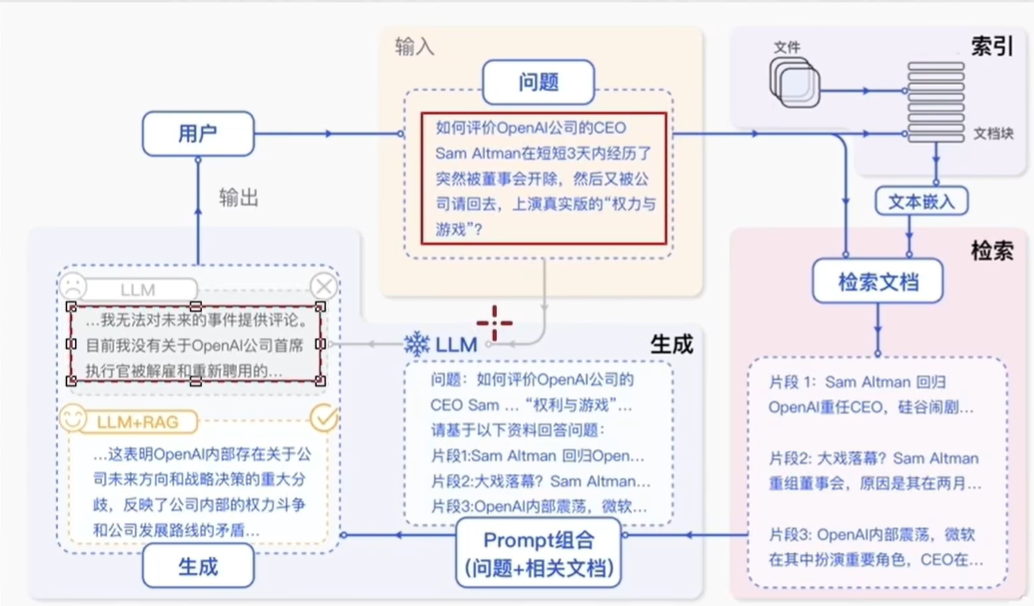
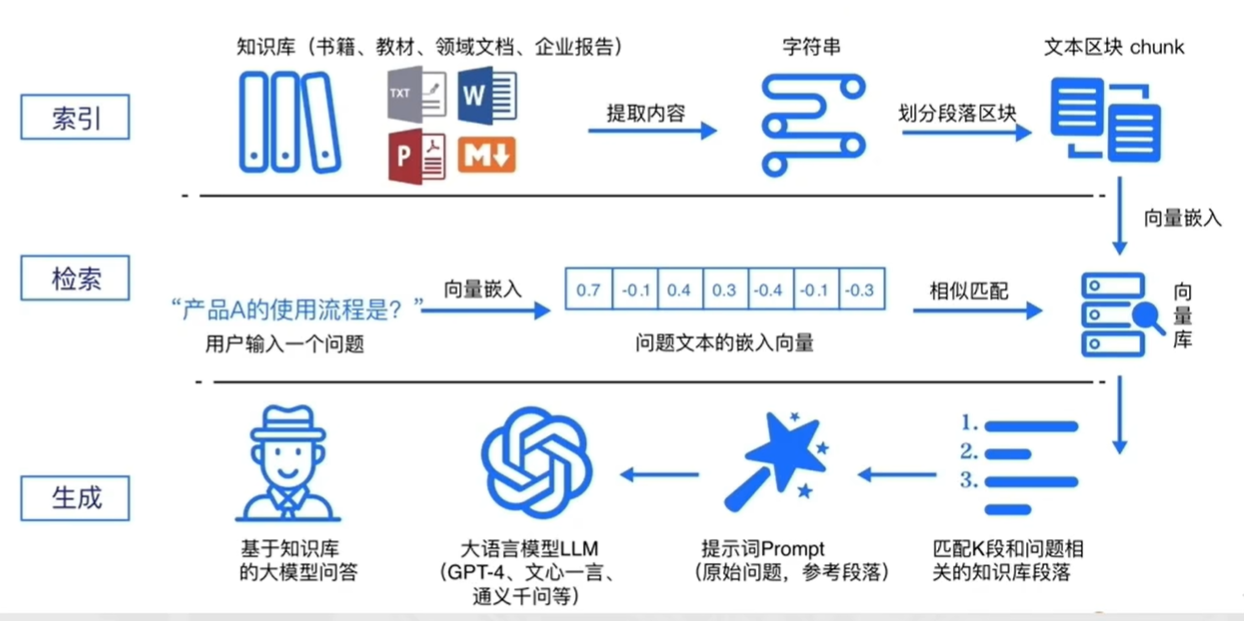
注:上图均来自于黑马程序员大模型RAG与Agent智能体项目实战教程
简单来说RAG工作分为两条线
- 离线流程-R(Retrieval检索):知识库预处理,通过查询各种的方式寻找文档/私有知识并加载,在分割,向量化之后形成向量数据库。
- 在线流程-A(Augmentation增强)G(Generation生成):用户提问->检索环节->Prompt融合->大模型回答
- 同时离线流程中的向量数据库会流向在线流程的检索环节。w
模型本质上就是用户输入,模型给出输出,用户能做的就是在输入上做功夫。
RAG 就是在向模型提问之前基于已有的知识库或文档内容做检索,确保向模型提问的内容更精准以及包含足够的信息量用以提供给模型。
RAG 的核心价值:
- 解决知识实效性问题:大模型的训练数据有截止时间,RAG 可以接入最新文档(如公司财报、政策文件),让模型输出 “与时俱进”。
- 降低模型幻觉:模型的回答基于检索到的事实性资料,而非纯靠自身记忆,大幅减少编造信息的概率。
- 无需重新训练模型:相比微调(Fine-tuning),RAG 只需更新知识库,成本更低、效率更高。
向量的基础概念
在RAG流程中,向量库是一个重要的节点,参考上述图片于RAG工作流程。
那么向量具体是什么
向量化:把一段文字的的语义信息,转换成遗传固定长度的数字列表,让计算机能看懂文字的含义并作相似度计算。
向量嵌入的过程,我们一般选用合适的文本嵌入模型来完成。
在向量匹配的过程中,如何识别 2 段文本是否表述相似的含义,主要可以通过如余弦相似度等算法来完成。
比如(下列案例中向量为示例,仅描述概念,非真实向量):
- A:“如何快速学打篮球” → [0.2, 0.5, 0.8]
- B:“打篮球怎么学得快” → [0.18, 0.52, 0.79]
- C:“运动后吃什么好呢” → [0.9, 0.1, 0.2]
通过余弦相似度算法可以计算得到:A 和 B 相似度 0.999789,A 和 C 相似度 0.361446
由此可通过精确的数学计算,去匹配 2 段文本是否描述同一个意思,提高语义匹配的效率和精度。
如何更为精准的完成语义匹配,生成向量的维度是一个很重要的指标。
如Text-embedding-v1模型可以生成1536维的向量(1536个数字序列),这1536个数字表示这段文本在1536个主题方向上的得分强度
选择合适的向量维度可以让匹配更精确,但是过大的向量维度会加大计算压力。
余弦相似度
向量的数字序列,共同决定了向量在高维空间中的方向和长度。而余弦相似度主要就是撇除长度的影响,得到方向的夹角。夹角越小越相似,即方向相同。
LangChain
Langchain组件
Models大语言模型的使用
现在市面上的模型多如牛毛,各种各样的模型不断出现,LangChain 模型组件提供了与各种模型的集成,并为所有模型提供一个精简的统一接口。
LangChain 目前支持三种类型的模型:LLMs(大语言模型)、Chat Models(聊天模型)、Embeddings Models(嵌入模型)。
- LLMs:是技术范畴的统称,指基于大参数量、海量文本训练的 Transformer 架构模型,核心能力是理解和生成自然语言,主要服务于文本生成场景
- 聊天模型:是应用范畴的细分,是专为对话场景优化的 LLMs,核心能力是模拟人类对话的轮次交互,主要服务于聊天场景
- 文本嵌入模型:文本嵌入模型接收文本作为输入,得到文本的向量。
LangChain 支持的三类模型,它们的使用场景不同,输入和输出不同,开发者需要根据项目需要选择相应。
我所用的阿里云通义千问系列主要来自于:langchain_community 包。
同时 LangChain 支持对许多模型的调用,以通义千问为例:
1
2
3
4
5
6
7
8
|
from langchain_community.llms.tongyi import Tongyi


model= Tongyi(model="qwen-max") # qwen-max是大语言模型才可以使用,即其他模型不可调用

res =model.invoke(input="你是谁")

print(res)
|
访问Ollama的话改为导入OllamaLLM类即可
Models的流式输出
如果需要流式输出结果,需要将模型的invoke方法改为stream方法即可。
- invoke方法:一次型返回完整结果
- stream方法:逐段返回结果,流式输出
 1
 2
 3
 4
 5
 6
 7
 8
 9
10
11
|
# langchain_community
from langchain_community.llms.tongyi import Tongyi

# 不用qwen3-max,因为qwen3-max是聊天模型,qwen-max是大语言模型
model = Tongyi(model="qwen-max")

# 调用invoke向模型提问
res = model.stream(input="你是谁呀能做什么?")

for chunk in res:
    print(chunk, end="", flush=True)
|
Models调用聊天大模型
聊天消息包含下面几种类型,使用时需要按照约定传入合适的值:
- AIMessage:就是 AI 输出的消息,可以是针对问题的回答。(对应 OpenAI 库中的assistant角色)
- HumanMessage:人类消息,即用户信息,由人给出的发送给 LLMs 的提示信息,比如 “实现一个快速排序方法”。(对应 OpenAI 库中的user角色)
- SystemMessage:可以用于指定模型具体所处的环境和背景,如角色扮演等。你可以在这里给出具体的指示,比如 “作为一个代码专家”,或者 “返回 json 格式”。(对应 OpenAI 库中的system角色)
 1
 2
 3
 4
 5
 6
 7
 8
 9
10
11
12
13
14
15
16
|
from langchain_community.chat_models.tongyi import ChatTongyi
from  langchain_core.messages import  HumanMessage,AIMessage,SystemMessage

model= ChatTongyi(model="qwen3-max")

messages=[
    SystemMessage(content="你是一个失意诗人"),
    HumanMessage(content="写一首唐诗"),
    AIMessage(content="孤灯照壁夜微凉,冷月窥窗影半墙。残菊犹存三径露,断鸿空唳九回肠。"),
    HumanMessage(content="按照你上一次回复写一首唐诗")
]

res=model.stream(input=messages)

for chunk in res:
    print(chunk.content,end="",flush=True)
|
同时也可有如下简写方式
 1
 2
 3
 4
 5
 6
 7
 8
 9
10
11
12
13
14
15
16
|
from langchain_community.chat_models.tongyi import ChatTongyi
from  langchain_core.messages import  HumanMessage,AIMessage,SystemMessage

model= ChatTongyi(model="qwen3-max")

messages = [
    ("system", "你是一个边塞诗人。"),
    ("human", "写一首唐诗"),
    ("ai", "锄禾日当午,汗滴禾下土,谁知盘中餐,粒粒皆辛苦。"),
    ("human", "按照你上一个回复的格式,再写一首唐诗。")
]

res=model.stream(input=messages)

for chunk in res:
    print(chunk.content,end="",flush=True)
|
嵌入模型的使用
Embeddings Models(文本嵌入模型)
Embeddings Models嵌入模型的特点:将字符串作为输入,返回一个浮点数的列表(向量)。
在NLP中,Embedding的作用就是将数据进行文本向量化。
阿里云千问模型访问方式:
1
2
3
4
5
6
7
8
|
from langchain_community.embeddings import DashScopeEmbeddings

初始化嵌入模型对象,其默认使用模型是: text-embedding-v1
embed = DashScopeEmbeddings()

测试
print(embed.embed_query("我喜欢你"))# 单词转换
print(embed.embed_documents(['我喜欢你', '我稀饭你', '晚上吃啥']))# 批量转换
|
ollama导入的话改为导入OllamaEmbeddings即可
通用Prompt
提示词优化在模型应用中非常重要,LangChain 提供了 PromptTemplate 类,用来协助优化提示词。
PromptTemplate 表示提示词模板,可以构建一个自定义的基础提示词模板,支持变量的注入,最终生成所需的提示词。
标准写法
 1
 2
 3
 4
 5
 6
 7
 8
 9
10
11
12
13
|
from langchain_core.prompts import PromptTemplate
from langchain_community.llms.tongyi import Tongyi

prompt_template = PromptTemplate.from_template(
    "我的邻居姓{lastname}, 刚生了{gender}, 帮忙起名字, 请简略回答。"
)

# 变量注入, 生成提示词文本
prompt_text = prompt_template.format(lastname="张", gender="女儿")

model = Tongyi(model="qwen-max")      # 创建模型对象
res = model.invoke(input=prompt_text) # 调用模型获取结果
print(res)
|
基于Chain链 的写法
 1
 2
 3
 4
 5
 6
 7
 8
 9
10
11
12
13
|
from langchain_core.prompts import PromptTemplate
from langchain_community.llms.tongyi import Tongyi

prompt_template = PromptTemplate.from_template(
    "我的邻居姓{lastname}, 刚生了{gender}, 帮忙起名字, 请简略回答。"
)

model = Tongyi(model="qwen-max")        # 创建模型对象
# 生成链
chain = prompt_template | model
# 基于链, 调用模型获取结果
res = chain.invoke(input={"lastname": "曹", "gender": "女儿"})
print(res)
|
FewShot写法
 1
 2
 3
 4
 5
 6
 7
 8
 9
10
11
12
13
14
15
16
17
18
19
20
21
22
23
24
25
|
from langchain_core.prompts import PromptTemplate, FewShotPromptTemplate
from langchain_community.llms.tongyi import Tongyi

# 示例的模板
example_template = PromptTemplate.from_template("单词: {word}, 反义词: {antonym}")

# 示例的动态数据注入 要求是list内部套字典
examples_data = [
    {"word": "大", "antonym": "小"},
    {"word": "上", "antonym": "下"}
]

few_shot_template = FewShotPromptTemplate(
    example_prompt=example_template,    # 示例数据的模板
    examples=examples_data,             # 示例的数据(用来注入动态数据的),list内套字典
    prefix="告知我单词的反义词,我提供如下的示例:",    # 示例之前的提示词
    suffix="基于前面的示例告知我,{input_word}的反义词是?",    # 示例之后的提示词
    input_variables=['input_word']     # 声明在前缀或后缀中所需要注入的变量名
)

prompt_text = few_shot_template.invoke(input={"input_word": "左"}).to_string()
print(prompt_text)

model = Tongyi(model="qwen-max")
print(model.invoke(input=prompt_text))
|
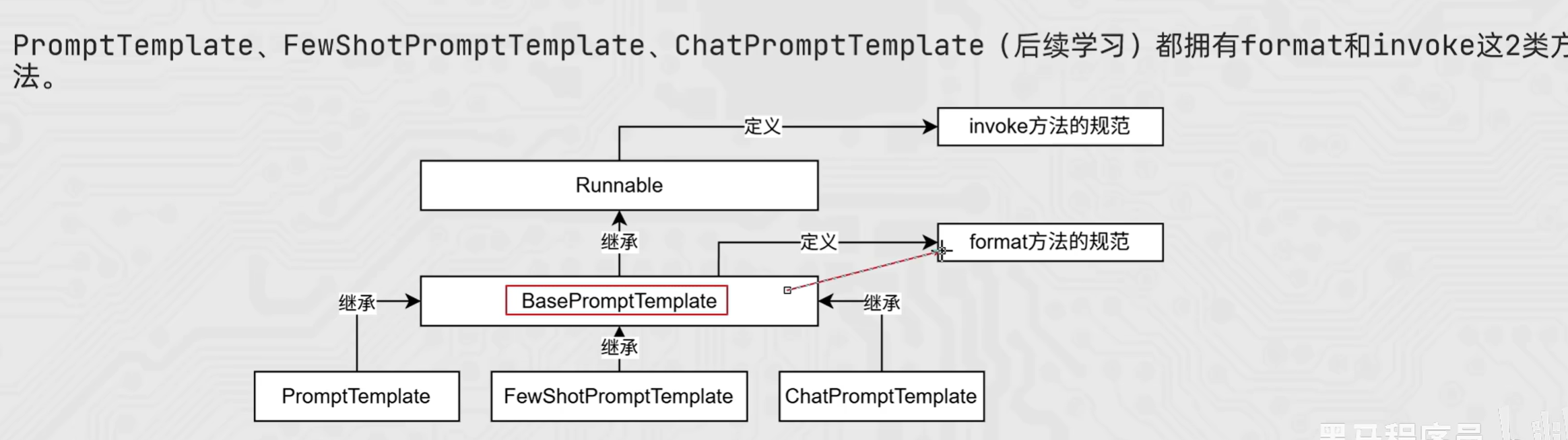
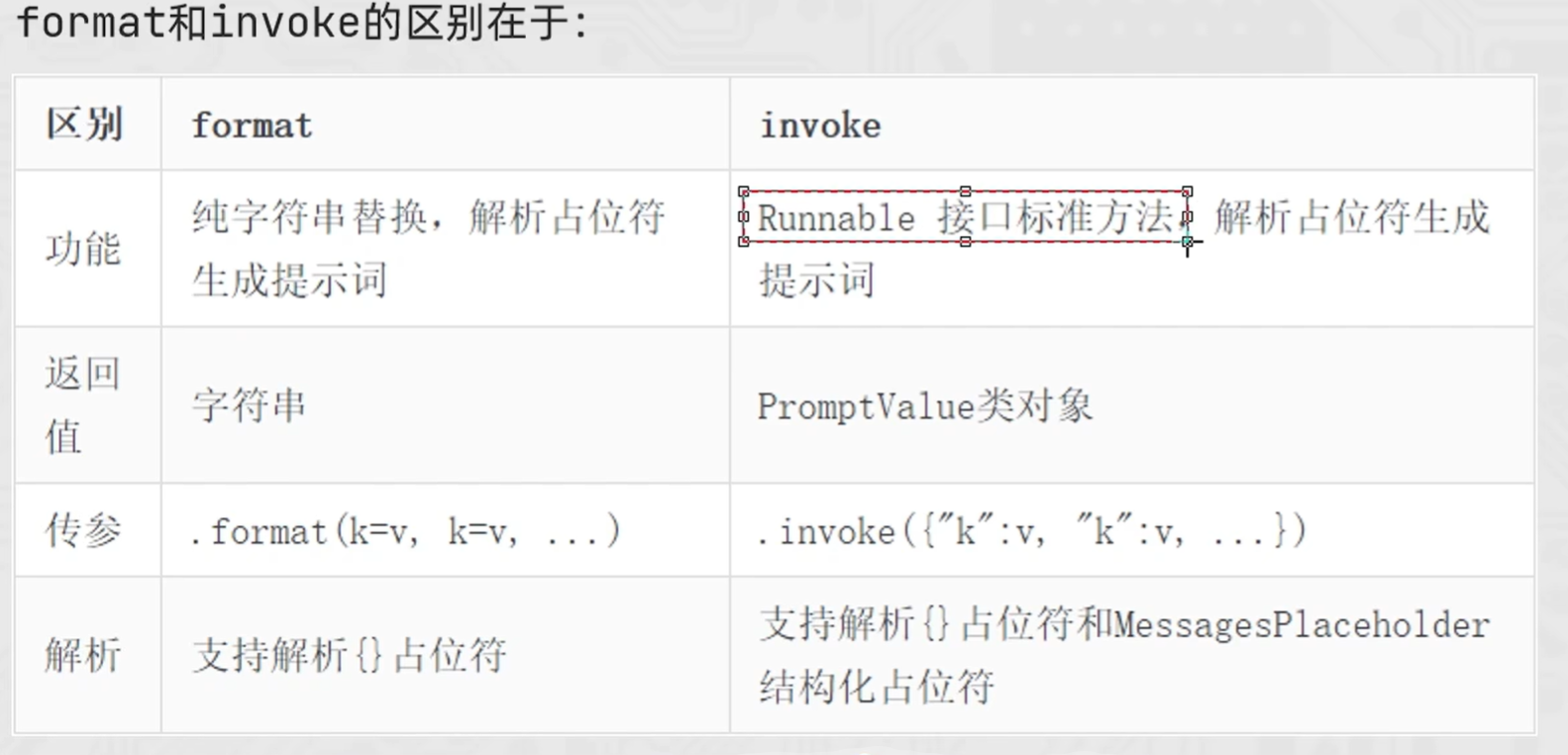
ChatPromptTemplate
PromptTemplate: 通用提示词模板,支持动态注入信息。
FewShotPromptTemplate: 支持基于模板注入任意数量的示例信息。
ChatPromptTemplate: 支持注入任意数量的历史会话信息。
- 通过from_messages方法,从列表中获取多轮次会话作为聊天的基础模板
- PS: 前面PromptTemplate类用的from_template仅能接入一条消息,而from_messages可以接入一个list的消息
 1
 2
 3
 4
 5
 6
 7
 8
 9
10
|
from langchain_core.prompts import ChatPromptTemplate

ChatPromptTemplate.from_messages(
    [
        ("system", "......."),
        ("ai", "......."),
        ......,
        ("human", ".......")
    ]
)
|
历史会话信息并不是静态的(固定的),而是随着对话的进行不停地积攒,即动态的。
所以,历史会话信息需要支持动态注入。
 1
 2
 3
 4
 5
 6
 7
 8
 9
10
11
12
13
14
15
16
17
18
19
20
|
from langchain_core.prompts import ChatPromptTemplate
from langchain_core.prompts import MessagesPlaceholder

chat_template = ChatPromptTemplate.from_messages(
    [
        ("system", "......."),
        ("ai", "......."),
        MessagesPlaceholder("history"),
        ("human", ".......")
    ]
)

history_data = [
    ("human", "..."),
    ("ai", "..."),
    ("human", "..."),
    ("ai", "...")
]

prompt_value = chat_template.invoke({"history": history_data})
|
 1
 2
 3
 4
 5
 6
 7
 8
 9
10
11
12
13
14
15
16
17
18
19
20
21
22
23
24
25
26
27
|
from langchain_core.prompts import ChatPromptTemplate,MessagesPlaceholder

from langchain_community.chat_models.tongyi import ChatTongyi

chat_prompt_template = ChatPromptTemplate.from_messages(
    [
        ("system", "你是一个边塞诗人,可以作诗。"),
        MessagesPlaceholder("history"),
        ("human", "请再来一首唐诗"),
    ]
)

history_data = [
    ("human", "你来写一个唐诗"),
    ("ai", "床前明月光,疑是地上霜,举头望明月,低头思故乡"),
    ("human", "好诗再来一个"),
    ("ai", "锄禾日当午,汗滴禾下锄,谁知盘中餐,粒粒皆辛苦"),
]

# StringPromptValue    to_string()
prompt_text = chat_prompt_template.invoke({"history": history_data}).to_string()

model = ChatTongyi(model="qwen3-max")

res = model.invoke(prompt_text)

print(res.content)
|